

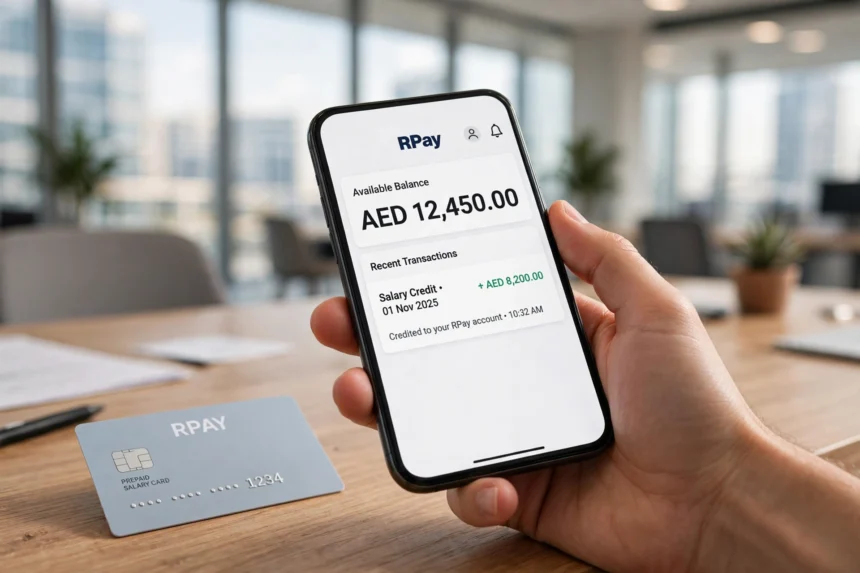
A RPay balance enquiry takes less than a minute when you use the right channel. Open the Al Rostamani International Exchange app, log in with your registered mobile number, and your available balance appears on the screen with your recent transactions. The website at alrostamaniexchange.com works the same way, and a supported ATM or a call to 600 540 004 covers the days when your phone has no internet. Before you try any of these, check the name printed on your card. RPay belongs to Al Rostamani International Exchange, and several lookalike salary cards in the UAE use completely different apps and numbers.
- What Is the RPay Card?
- What You Need Before a RPay Balance Enquiry
- RPay Balance Enquiry Through the App
- RPay Balance Enquiry Online
- RPay Balance Enquiry at an ATM
- RPay Balance Enquiry by Phone or at a Branch
- Reading Your Balance the Right Way
- RPay, Ratibi, LuLu and RAKBANK: Do Not Mix Them Up
- Common Problems and How to Fix Them
- Keeping Your RPay Card Safe
- Using the Card Day to Day
- Frequently Asked Questions
What Is the RPay Card?
RPay is a payroll card issued through Al Rostamani International Exchange, one of the oldest exchange houses in the UAE. It was set up so employers can pay workers electronically under the UAE Wage Protection System, known as WPS. Instead of a bank transfer into a current account, your salary lands on the card each month, and you can withdraw cash, pay in shops, or send money home from it.
The card suits workers who do not hold a regular bank account. Many companies in construction, hospitality, cleaning, security, and retail pay their staff this way. Your employer arranges the card, and Al Rostamani International Exchange issues it. You do not open it yourself the way you would open a bank account, and it is not a credit card. You can only spend what has been loaded onto it.
A few facts help you place the card correctly:
- The issuer is Al Rostamani International Exchange, often shortened to ARIE.
- The card works under the WPS rules set by the Ministry of Human Resources and Emiratisation, known as MOHRE.
- Salary credits arrive by electronic transfer from your employer, and Al Rostamani sends a free SMS alert to your registered mobile number each time money lands.
- The card carries a PIN for ATM withdrawals and shop payments, just like a bank debit card.
What You Need Before a RPay Balance Enquiry
A failed check usually comes down to one missing detail. Gather these four things before you start, and the process runs smoothly.
| What you need | Where to find it |
|---|---|
| Your RPay card | The card your employer gave you |
| Your registered mobile number | The number you gave your employer when the card was issued |
| Your card PIN | The PIN you set or received with the card |
| Your Emirates ID | Needed for first-time registration in the app |
Your registered mobile number matters most. The app sends a one-time password, called an OTP, to that number every time you log in. If you changed your number and never updated it with your employer or at an Al Rostamani branch, the OTP goes to the old number and you cannot get in. Fix the number first, then try the balance check again.
RPay Balance Enquiry Through the App
The Al Rostamani International Exchange app is the fastest option for most cardholders, and it is the method the company itself points people to first. It shows your balance and your recent transactions in one place, so you can see your salary credit, your withdrawals, and your shop payments together.
Follow these steps:
- Open the Google Play Store or the Apple App Store on your phone.
- Search for Al Rostamani International Exchange and check that Al Rostamani International Exchange is named as the developer before you install anything. Fake apps with similar names do appear, and installing the wrong one puts your card details at risk.
- Open the app and register with your Emirates ID and your registered mobile number.
- Add your RPay card when the app asks for it.
- Enter the OTP sent to your registered mobile number.
- Open the RPay or C3 Balance Check section. Your available balance shows on the screen, along with recent transactions.
Once you are registered, later checks take seconds. Open the app, log in, and the balance is there. Turn on notifications if the app offers them, so you get an alert the moment your salary is credited instead of checking by hand every day.
If the app will not accept your card, stop and check the card name first. A Ratibi card, a LuLu salary card, and a RAKBANK prepaid card all look similar at a glance, and none of them work inside the Al Rostamani app. The comparison table later in this article shows which channel belongs to which card.
RPay Balance Enquiry Online
If you prefer a bigger screen, or your phone storage is full, the website does the same job. Go to alrostamaniexchange.com directly by typing the address into your browser. Do not reach it through a link in a text message or a search advert, because fake pages copy the design of the real site.
- Open alrostamaniexchange.com in your browser.
- Find the login option on the homepage.
- Enter your registered email address or username and your password.
- Open the Balance Inquiry section inside your account dashboard.
- Your current balance appears on the screen, with details of recent transactions.
New users need to create an account on the portal first, using the card number and the registered mobile number. The portal then sends an OTP to confirm it is really you. Keep your login details private, and never share your OTP with anyone, including someone who claims to be calling from the exchange house. Real staff never ask for your OTP or your PIN.
RPay Balance Enquiry at an ATM
An ATM check is the best fallback when you have no internet or the app is down. Al Rostamani Exchange operates ATMs at selected locations, including some large labour accommodation sites, and other supported ATMs in the UAE also accept the card.
- Insert your RPay card into the ATM.
- Enter your PIN.
- Choose Balance Inquiry from the menu on the screen.
- Your available balance appears on the screen. Take the printed receipt if you want a paper record.
Two things to keep in mind at an ATM. First, a small fee can apply on some machines depending on the network, so an app or website check costs you nothing while an ATM check sometimes does not. Second, never let anyone stand close enough to watch you type your PIN, and take your card back before you walk away. If the machine keeps your card, call 600 540 004 straight away and report it.
RPay Balance Enquiry by Phone or at a Branch
When the digital options fail, the human ones still work. Call Al Rostamani Exchange on 600 540 004 from inside the UAE, or on +971 4 454 3200 from outside the UAE. Have your card number and your Emirates ID details ready, because the agent needs to confirm your identity before sharing any balance information.
You can also walk into an Al Rostamani Exchange branch with your card and your Emirates ID. Staff at the counter can check your balance and help with problems like a blocked card or a mobile number that needs updating. Branch visits take longer than the app, so keep them for problems the app cannot solve. The exchange house contact page lists working hours of 8:30 am to 5:30 pm, so plan a morning visit if you need counter help.
| Method | What you need | Speed | Fee |
|---|---|---|---|
| ARIE app | Registered mobile number, Emirates ID | Instant | No separate balance check charge |
| Website portal | Login details, OTP | Instant | No separate balance check charge |
| ATM | Card and PIN | A few minutes | Can vary by machine |
| Phone helpline | Card number, Emirates ID details | A few minutes | Standard call charges may apply |
| Branch visit | Card and Emirates ID | Depends on the queue | No separate balance check charge |
Reading Your Balance the Right Way
The number on the screen is your available balance, which is the money you can spend right now. It already reflects salary credits that have cleared, withdrawals, shop payments, and other processed transactions. A salary transfer that your employer sent but that has not cleared yet will not show in the available balance, so do not panic if the money is not there the same hour your employer says it was sent.
Check the transaction list under the balance when something looks wrong. It shows each salary credit and each deduction with a date, so you can spot a double charge or a withdrawal you do not recognise. If a transaction looks wrong, note the date and the amount, then call the helpline. Keep any receipts from ATMs and shops until the transaction shows correctly in the app, because the receipt is your proof if a dispute comes up.
A salary credit that never arrives has a few usual causes. Your employer may have paid late, the transfer may still be processing, or the card may be blocked. Check with your employer first to confirm the payment was sent, then call Al Rostamani on 600 540 004 if the employer confirms it was sent and the money still has not appeared after a working day or two.
RPay, Ratibi, LuLu and RAKBANK: Do Not Mix Them Up
This is where most failed balance checks begin. The UAE has several salary and prepaid cards, and each one has its own app, website, and helpline. Typing your RPay card number into the wrong portal wastes your time, and in the worst case it hands your details to a site that was never meant for your card.
| Card | Issuer | Where to check the balance |
|---|---|---|
| RPay | Al Rostamani International Exchange | ARIE app, alrostamaniexchange.com, supported ATM, 600 540 004 |
| Ratibi | First Abu Dhabi Bank (FAB) | FAB or Magnati prepaid card portal |
| LuLu salary card | LuLu Exchange | LuLu Exchange app or portal |
| RAKBANK prepaid card | RAKBANK | SMS BAL plus your Card ID to 2737, or call 600 54 4049 |
Read the issuer name printed on the front or back of your card before you start. If it says Al Rostamani, use the RPay channels in this article. If it says something else, use that issuer’s channel instead. The RAKBANK SMS code and the Ratibi portal do not work for RPay cards, and the RPay app does not work for other issuers’ cards.
Common Problems and How to Fix Them
The OTP never arrives. Check that your phone has a signal and that the number in the app matches the number you use now. If you changed your number, update it with your employer or at a branch first. Wait a minute, then ask for a new code. Repeated requests in a row can lock the login for a short while, so do not tap resend ten times.
The app says the card is not recognised. Confirm the card name and the card number you typed. A single wrong digit blocks the check. If the details are right and it still fails, the card may be blocked or expired. Call 600 540 004 and ask the agent to check the card status.
The balance is lower than you expected. Open the transaction list and look for withdrawals, shop payments, and transfer charges. An ATM fee or a transfer you forgot can explain the gap. If every transaction looks familiar and the total still does not add up, keep your receipts and call the helpline.
Your salary has not been credited. Confirm the payment date with your employer. Salaries are usually processed on a set day each month, and a weekend or public holiday can push the credit by a day. If your employer confirms the transfer went out and two working days have passed, call Al Rostamani and ask them to trace it.
You forgot your PIN. Do not guess it at an ATM. Too many wrong tries block the card. Call the helpline or visit a branch with your Emirates ID to reset it.
The website or app is down. Wait a short while and try again, or use an ATM in the meantime. Avoid searching for a different balance check website while the official one is down, because fake sites buy adverts around exactly these moments.
Keeping Your RPay Card Safe
A salary card holds a month of wages, so it attracts scammers. A few habits protect it.
- Never share your PIN, your OTP, or your full card number with anyone, even someone who says they work for the exchange house or your employer. Real staff never ask for these.
- Download the app only from the Google Play Store or the Apple App Store, and confirm Al Rostamani International Exchange is listed as the developer.
- Type alrostamaniexchange.com into your browser yourself instead of tapping links in text messages, emails, or social media adverts.
- Ignore messages that claim your card is blocked and ask you to tap a link or send a code. Call 600 540 004 yourself if you are worried.
- Check your balance and your transaction list regularly, even when you expect nothing to change. A quick weekly look catches a wrong deduction early, when it is easiest to fix.
- Keep your registered mobile number up to date. Every security alert and every OTP goes to that number, so an old number leaves you blind.
If you lose the card, call the helpline at once and ask them to block it. A blocked card stops anyone else from spending your salary while a replacement is arranged. Tell your employer as well, so the next salary credit is not delayed.
Using the Card Day to Day
Beyond the balance check, the RPay card covers everyday money needs. Withdraw cash at supported ATMs when you need it, and pay directly in shops and supermarkets where card payments are accepted. Salary credit alerts arrive by free SMS, so you know the moment your wages land without opening the app.
Sending money home is a common use. Al Rostamani International Exchange runs remittance services, so you can move part of your salary to family abroad through the same company that issued the card. Rates and charges change, so confirm them at the branch or in the app before you send, and keep the receipt until the money reaches the other end.
Budgeting gets easier once the balance check becomes a habit. Check the balance on payday, note the amount, and compare it with what you plan to spend and send home. A short weekly check takes less than a minute and stops the end-of-month surprise of a balance that ran out early.
Frequently Asked Questions
How do I check my RPay balance enquiry online?
Open the Al Rostamani International Exchange app or go to alrostamaniexchange.com, log in with your registered mobile number and OTP, then open the RPay or C3 Balance Check section. Your available balance and recent transactions appear on the screen.
Is there a fee for a RPay balance enquiry?
Checking through the official app or website carries no separate balance enquiry charge. ATM checks can carry a small fee on some machines, depending on the network, so confirm it on the screen before you finish the transaction.
Can I check my RPay balance without the app?
Yes. Use the website portal at alrostamaniexchange.com, a supported ATM with your card and PIN, or call 600 540 004 from inside the UAE. A branch visit with your card and Emirates ID works as well.
Why is my RPay balance enquiry showing the wrong amount?
The screen shows your available balance after cleared transactions. A salary transfer that has not cleared yet, a pending shop payment, or an ATM fee can make the figure look different from what you expected. Check the transaction list, and call the helpline if a charge looks wrong.
What is the difference between RPay and Ratibi?
RPay is issued by Al Rostamani International Exchange, while Ratibi is issued by First Abu Dhabi Bank. They are separate payroll products with separate apps and portals, so a balance check for one does not work on the other’s system.
What should I do if I lose my RPay card?
Call 600 540 004 immediately and ask them to block the card, then tell your employer. Visit a branch with your Emirates ID to arrange a replacement.
Can I use my RPay card outside the UAE?
Card acceptance outside the UAE depends on the card network and the terms set when the card was issued. Confirm this with Al Rostamani before you travel, and carry a backup way to pay.
If your salary arrives on an RPay card, the app is the fastest way to stay on top of your money. Set it up once with your Emirates ID and your registered mobile number, and every later RPay balance enquiry takes seconds. When the app is out of reach, the website, an ATM, the helpline on 600 540 004, or a branch visit will do the same job. Just make sure you are using the channel that belongs to your card, and keep your PIN and OTP to yourself.