

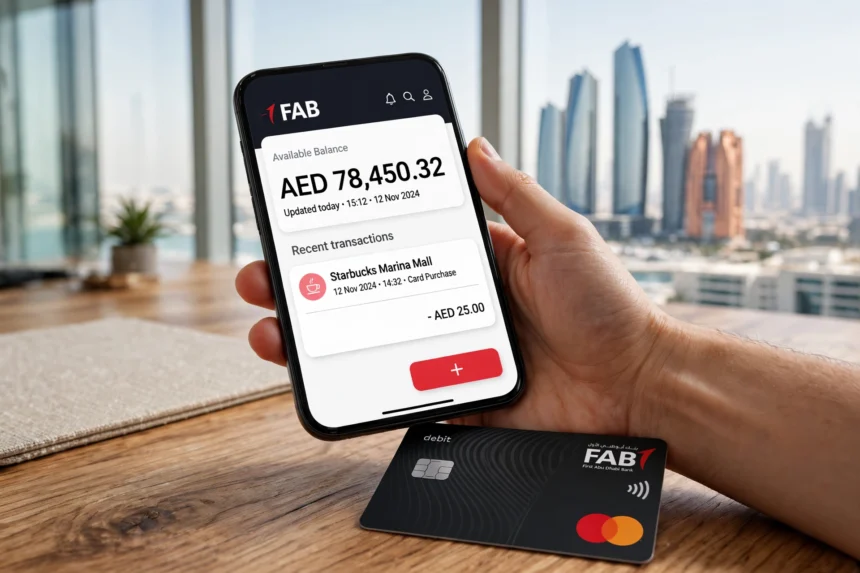
A FAB enquiry takes less than a minute once you use the channel that matches the product you hold. If you have a regular First Abu Dhabi Bank savings or current account, open the FAB Mobile app and your balance shows on the home screen right after you log in. If your salary lands on a Ratibi or prepaid card, use the Magnati prepaid portal instead, because the app may not show a balance for a card-only product. With no internet at all, send BAL plus the last four digits of your account number to 2121 by SMS, or walk up to any FAB ATM. This article covers every official method, step by step, so you can pick the fastest one for your situation and avoid the mistakes that send people to the wrong portal.
- What a FAB Enquiry Covers
- FAB Balance Check Methods at a Glance
- FAB Enquiry Through the Mobile App
- FAB Enquiry Through Online Banking
- FAB Enquiry by SMS to 2121
- FAB Enquiry at an ATM
- FAB Enquiry by Phone Banking
- FAB Enquiry for Ratibi and Prepaid Salary Cards
- FAB Enquiry Through the Payit Wallet
- Available Balance Versus Current Balance
- Picking the Fastest Method for Your Situation
- When a FAB Enquiry Fails
- Staying Safe While You Check
- Frequently Asked Questions
- The Short Version
What a FAB Enquiry Covers
First Abu Dhabi Bank, known as FAB, is the largest bank in the UAE by assets. It was formed in 2017 when the National Bank of Abu Dhabi and First Gulf Bank merged, and all the old NBAD services now run under the FAB name. That history matters for one practical reason. Older cards, apps, and web pages still carry the NBAD name in places, and some people search for NBAD balance check when they mean FAB. The methods below all work under the current FAB brand.
A balance check is not the same for every FAB customer, because FAB issues three different kinds of products:
- A regular savings or current account, with a debit card linked to it. You opened this yourself at a branch or online.
- A Ratibi or prepaid salary card, loaded by your employer each month under the Wage Protection System. You may not hold a bank account behind it.
- A FAB credit card, with its own balance and its own SMS command.
The card in your wallet decides which method works. A regular account holder can use the app, online banking, SMS, phone banking, or an ATM. A Ratibi cardholder needs the prepaid portal. A credit card holder uses the same app, but a different SMS keyword. The table below gives you the short version before the detailed steps.
FAB Balance Check Methods at a Glance
| Method | Best for | Internet needed | What you need |
|---|---|---|---|
| FAB Mobile app | Daily checks, full account holders | Yes | App login, Face ID or fingerprint |
| Online banking | Statements and full history on a computer | Yes | Personal banking login at bankfab.com |
| SMS to 2121 | No internet, basic phones | No | Registered mobile number, last 4 digits of account |
| FAB ATM | No phone, no signal | No | Card and PIN |
| Phone banking | Speaking to the bank, no app | No | Account details, call 600 52 5500 |
| Magnati prepaid portal | Ratibi and prepaid salary cards | Yes | Card number, last 4 digits, CAPTCHA |
| Payit wallet | FAB wallet users | Yes | Payit app login |
Every digital method is available around the clock. Checking your balance through the app, online banking, SMS, phone banking, or a FAB ATM costs nothing. A balance check at a non-FAB ATM in the UAE may carry a small fee of around AED 1, so use a FAB machine when you can.
FAB Enquiry Through the Mobile App
The FAB Mobile app is the fastest option for regular account holders, and it is the method the bank itself points people to first. It works on iOS and Android, and it shows your available balance on the home screen as soon as you log in, along with recent transactions, so you can see what came in and what went out without opening another screen.
Follow these steps:
- Download the FAB Mobile app from the Apple App Store or the Google Play Store. Check that First Abu Dhabi Bank is named as the developer before you install anything.
- Open the app and register with your Customer ID or your card number, plus the mobile number registered with your account.
- Set up Face ID, fingerprint, or a passcode when the app offers it. Biometric login makes every later check a matter of seconds.
- Log in and look at the home screen. Your available balance shows there for each account you hold.
- Tap an account to see recent transactions, pending payments, and the split between your available balance and your current balance.
If you hold more than one FAB account, swipe or tap between them on the same screen. Savings accounts, current accounts, and credit cards each appear separately, so check that you are reading the right one before you act on the number. The app also lets you download a mini statement, set up alerts, and pay bills, which makes it worth keeping on your phone even if you only check your balance once a month.
One common problem: the app shows no balance at all, or it shows an old card. That usually means you hold a Ratibi or prepaid salary card rather than a regular account. The app is built around accounts, and a card-only product may not appear in it. In that case, skip to the prepaid portal section below instead of reinstalling the app.
FAB Enquiry Through Online Banking
If you prefer a bigger screen, or you want a full statement rather than a single number, online banking is the better choice. Log in at bankfab.com and open Personal Banking, or go straight to the online banking portal at online.bankfab.com. Both lead to the same dashboard.
- Open bankfab.com in your browser by typing the address yourself. Never reach it through a link in a text message, an email, or a search advert, because fake pages copy the design of the real site.
- Click Login and choose Personal Banking.
- Enter your username and password, then the one-time password sent to your registered mobile number.
- Your accounts appear on the dashboard with the available balance for each one.
- Open any account to view the full transaction history and download an e-statement in PDF form.
Online banking suits people who want detail. You can search past transactions, check when a cheque cleared, and confirm whether a salary credit has actually landed. For a quick number before you pay for something, the app is faster. For sorting out a missing payment or checking a month of spending, the website wins.
Keep your login details private. The bank never asks for your password or your one-time password by phone, SMS, or email. If someone calls claiming to be from FAB and asks for either one, end the call and dial 600 52 5500 yourself.
FAB Enquiry by SMS to 2121
SMS banking is the most useful method when you have no internet, no smartphone data, or only a basic phone. It works from your registered mobile number, and the reply arrives within about 30 seconds.
For a regular savings or current account, type BAL, a space, and the last four digits of your account number, then send it to 2121. For example, if your account number ends in 4821, send BAL 4821. The bank replies with your available balance.
For a credit card, the keyword is different. Type CBAL, a space, and the last four digits of your card number, then send it to 2121. Using BAL for a credit card will not give you the card balance, and this mix-up is one of the most common reasons an SMS check seems to fail.
A few points to keep in mind:
- Send the SMS only from the mobile number registered with your account. A message from any other number will not be answered.
- Standard SMS charges from your provider, Etisalat by e& or du, may apply. The balance check itself is free.
- If nothing comes back, SMS banking may not be active on your line yet. You can switch it on through the app, or ask for it at a branch or by calling 600 52 5500.
- Save 2121 in your contacts as FAB SMS so you do not have to look the number up each time.
SMS alerts are a separate service from SMS banking. Many account holders receive an automatic text after every transaction, showing the new balance. That is useful, but it is not the same as sending a BAL message on demand. If your alerts stop arriving, your registered number may have changed, and the bank needs the new one before either service works properly.
FAB Enquiry at an ATM
An ATM is the best backup when your phone has no battery, no signal, or no data. Every FAB ATM across the UAE offers a balance check in under a minute.
- Insert your FAB debit, credit, or prepaid card into any FAB ATM.
- Enter your four-digit PIN.
- Select Balance Inquiry from the menu.
- Your available balance appears on the screen. You can also print a mini statement if the machine offers it.
FAB ATMs charge nothing for a balance check. Other banks’ ATMs in the UAE may charge around AED 1 for the same check, so a FAB machine is the cheaper option. You can also use an ATM to change your PIN, withdraw cash, and deposit money, which makes it the one method that needs no phone at all.
If the machine keeps your card or shows an error, do not try the same card in another machine right away. Note the ATM location and the time, then call 600 52 5500. The bank can confirm whether the card was retained and how to collect it.
FAB Enquiry by Phone Banking
If you would rather speak to the bank, or every digital method has failed, phone banking covers it. Inside the UAE, call 600 52 5500. From outside the UAE, call +971 2 681 1511. The line runs 24 hours a day.
The automated system can read out your balance after it verifies you, usually through your registered mobile number, your account number, or your Emirates ID. If you need a person, stay on the line and ask for an agent. Have your account number and Emirates ID ready before you call, because the agent will ask for them to confirm your identity.
Phone banking also helps when something looks wrong. A balance that does not match your records, a transaction you do not recognise, or a card that stopped working are all good reasons to call rather than keep trying the app. The agent can see the same account you see, plus pending holds and blocked amounts that the app does not always explain clearly.
FAB Enquiry for Ratibi and Prepaid Salary Cards
This is the section most people need, and the one where most failed checks happen. If your salary lands on a Ratibi card, a LuLu salary card, or any other FAB prepaid card issued through your employer, you may not have a bank account at all. The FAB app and the BAL SMS command are built for accounts, so they may not return your card balance.
Use the official prepaid card inquiry portal instead:
- Open a browser and go to ppc.magnati.com/ppc-inquiry. Magnati runs the prepaid card platform for FAB.
- Enter the last four digits of your card and your Card ID when asked, then complete the CAPTCHA.
- Your available balance shows on the screen, with recent transactions.
No registration is needed for a one-off check, and the portal is free. Do not enter your full 16-digit card number, your PIN, or your CVV on any other site that claims to check a FAB salary card balance. The official portal asks only for the last few digits and the Card ID.
If you are not sure which card you hold, look at the name printed on it. A Ratibi card says Ratibi. A LuLu salary card is issued through LuLu Exchange and works with its own check methods, covered in our article on Lulu salary card balance check UAE. A RPay card belongs to Al Rostamani International Exchange, covered in our RPay balance enquiry article. Each card has its own portal, and none of them work inside the others’ apps.
FAB Enquiry Through the Payit Wallet
Payit is FAB’s digital wallet app, and it offers another way to see a balance if you already use it for payments. Download Payit from the App Store or Google Play, log in with your registered mobile number, and your wallet balance shows on the home screen. You can top it up from a FAB account or card, send money to other Payit users, and pay in shops without carrying a card.
Payit shows the wallet balance, not your bank account balance. If you need the account figure, use the FAB Mobile app or SMS instead. Payit is handy as a backup check when your bank app is updating or your card is at home, because it runs on the same registered number.
Available Balance Versus Current Balance
Most confusion after a balance check comes from two different numbers. FAB shows both, and they rarely match exactly.
- Available balance is the money you can spend or withdraw right now. It is the number that matters before you pay for something.
- Current balance, also called ledger balance, is the total in the account including transactions that have not cleared yet.
A card payment you made yesterday can sit as pending for a day or two, which lowers your available balance while the current balance still shows the older figure. A cheque you deposited may show in the current balance before the money is cleared for spending. A salary credit usually shows in both at once. When the two numbers differ, trust the available balance for spending decisions, and check the transaction list to see which payment is still pending.
Picking the Fastest Method for Your Situation
| Your situation | Use this first |
|---|---|
| Regular account, phone in hand | FAB Mobile app |
| Need a full statement or a month of history | Online banking at bankfab.com |
| No internet, basic phone | SMS BAL to 2121 |
| No phone, no signal | Any FAB ATM |
| Salary on a Ratibi or prepaid card | Magnati portal at ppc.magnati.com |
| Outside the UAE | App, online banking, or call +971 2 681 1511 |
| Something looks wrong | Phone banking on 600 52 5500 |
If you check your balance every day, the app is the obvious home for it. Set up biometric login once, and the check takes seconds. If you check once a month on salary day, SMS or the prepaid portal may be all you need, and there is no reason to install anything new.
When a FAB Enquiry Fails
A failed check almost always comes down to one of a handful of causes. Work through them in order before you visit a branch.
The SMS gets no reply. Check that you sent it from your registered mobile number, that you typed BAL with the last four digits of the account number, and that SMS banking is active on your line. If you recently changed your number, update it with the bank first.
The app will not log you in. Confirm you are using the official FAB Mobile app, not a lookalike. Reset the passcode through the forgot option, and check that the phone number on the account is still yours. Repeated wrong attempts can lock the login for a short time, so wait before trying again.
The balance is zero or missing. Check that you are looking at the right account or the right card. A Ratibi balance will not appear in the FAB app, and a credit card balance will not appear under a BAL SMS. Use CBAL for credit cards and the Magnati portal for prepaid cards.
The balance does not match your records. Look for pending card payments, which reduce the available balance before they appear as settled transactions. Check for a cheque deposit that has not cleared. If a transaction looks unfamiliar, call 600 52 5500 rather than guessing.
The prepaid portal rejects your card. Make sure you entered the last four digits of the card, not the account number, and that the CAPTCHA was completed. Some employer-issued cards are checked through a different portal named on the card itself, so read the back of the card before trying again.
You never receive an OTP. The one-time password goes to your registered mobile number. If you changed numbers or your SIM is inactive, the bank cannot reach you. Update the number at a branch with your Emirates ID, then try again.
Staying Safe While You Check
Balance checks are a favourite target for scams, because a fake login page only needs your password once. Keep these habits:
- Type bankfab.com yourself. Never log in through a link in a SMS, an email, or an advert.
- Check that the app developer is First Abu Dhabi Bank before installing or updating the app.
- Never share your PIN, your password, or a one-time password with anyone, including someone who calls claiming to be from the bank.
- Never enter your full card number, CVV, or PIN on a balance check website. The official channels ask only for the last four digits.
- Log out of online banking on shared computers, and avoid checking your balance on public Wi-Fi.
- If a text message claims your account is blocked and tells you to click a link, treat it as a scam and call 600 52 5500 yourself.
FAB also sends transaction alerts to your registered number after most account activity. Keep them switched on. A fast alert is often the first sign that a card has been used without your knowledge.
Frequently Asked Questions
How long does a FAB enquiry take?
The app shows your balance within seconds of login. An SMS reply to 2121 arrives in about 30 seconds. An ATM check takes under a minute. Phone banking depends on the queue, so the app or SMS is faster for a routine check.
Is a FAB enquiry free?
Yes, through the app, online banking, SMS banking, phone banking, and FAB ATMs. A balance check at another bank’s ATM may cost around AED 1. Standard SMS charges from your mobile provider may apply to the 2121 message.
Can I check my FAB balance without internet?
Yes. Send BAL plus the last four digits of your account number to 2121 by SMS, or use any FAB ATM with your card and PIN. Phone banking on 600 52 5500 also works without internet.
Can I check my FAB balance from outside the UAE?
Yes. The app and online banking work anywhere with internet. From abroad, call +971 2 681 1511 for phone banking. SMS to 2121 may carry international charges, so the app is the cheaper option while you travel.
Why does the FAB app not show my salary card balance?
Ratibi and prepaid salary cards are card-only products with no bank account behind them, so they do not appear in the app. Check them on the Magnati prepaid portal at ppc.magnati.com instead.
What is the difference between BAL and CBAL?
BAL checks a savings or current account balance using the last four digits of the account number. CBAL checks a credit card balance using the last four digits of the card number. Both go to 2121.
What should I do if I lose my FAB card?
Block it at once through the app or by calling 600 52 5500, then request a replacement. Check your recent transactions first, so you can report anything you do not recognise in the same call.
If you also travel around the UAE by bus, the same habit of a quick balance check applies to your transport card. Our article on the Hafilat smart card in Abu Dhabi covers how to check and top up that balance. And if a day out is on your mind rather than banking, Atlantis Water Park Dubai and Love Lake Dubai are two very different ways to spend it.
The Short Version
A FAB enquiry is a two-minute job when you match the method to the product. Regular account holders should use the FAB Mobile app for daily checks and online banking for statements. SMS to 2121 with BAL covers the days with no internet, and CBAL covers credit cards. Ratibi and prepaid salary card holders should go straight to the Magnati portal. Keep your registered mobile number up to date, type bankfab.com yourself, and never share a PIN or a one-time password. Do that, and your balance is always one tap, one text, or one call away.